
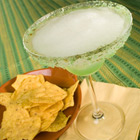
 I am absolutely loving this hot summer weather, and this week I happened to make a drink that fit the conditions perfectly: a nice frozen margarita. I have consumed my fair share of margaritas, but I’ve never taken the time to make one. I found this great recipe on AllRecipes, but here it is again crafted for the Magic Bullet Blender.
Ingredients:
- Gold Tequila
- Triple Sec
- Thawed 355ml can of Minute Maid Limeade Concentrate
- Ice
- A lime
Directions:
- Fill the bullets carafe with as much ice as you can pack in.
- Add 110ml of the thawed limeade concentrate.
- Add 85ml of Tequila.
- Add 30ml of Triple Sec.
- Now blend until smooth (30 – 45 seconds).
- Squeeze in a lime wedge, drop in a straw, and enjoy.
Note: 1 can of the limeade concentrate makes 3 of these drinks.
We enjoyed this drink with some Tostitos and salsa. Yum, and good night.